Desktop Guide
What is this section about?
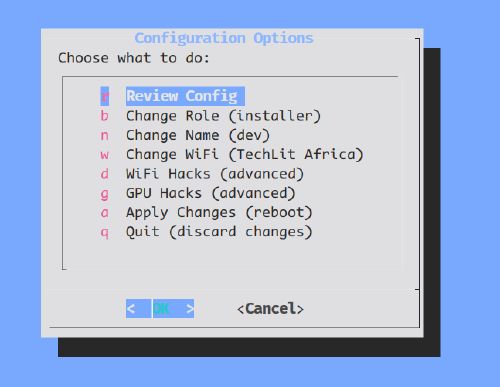
System Reconfiguration (tl-sys-configure)
It is the primary tool for setting a computer’s core identity and hardware config.
Note
Launch it by typing tl-sys-configure in tty2 (logged in as admin).
Key Functions
- Role Assignment: Configure the machine as a
serveror aclient. - Network Setup: Set the Wi-Fi network name (SSID) for client computers.
- Hostname: Define the computer’s unique name on the network (e.g.,
tl-1234). - Hardware Hacks: Enable special workarounds for hardware issues.
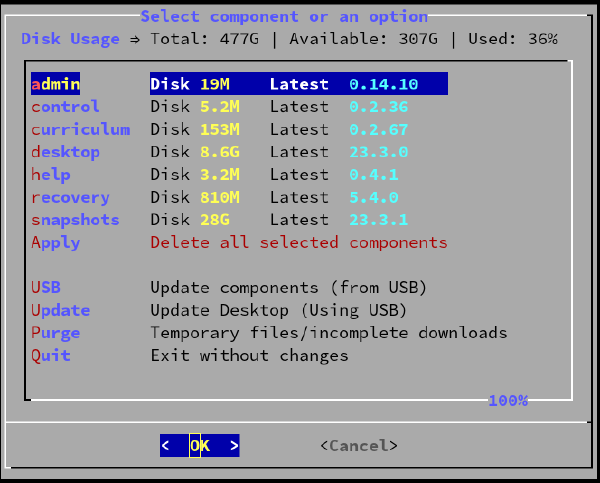
Components Management (tl-comp-manage)
This tool is for managing system components and storage. It helps you see what’s installed and free up disk space by removing old components.
Note
You can launch it by typing tl-comp-manage in terminal or
Search for “Manage Components” in the application menu.
Core Functions
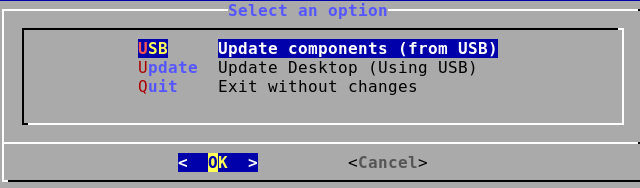
Component Updates (tl-comp-update)
This tool is for updating system components, including the desktop OS, from a USB drive.
Note
You can launch it by typing tl-comp-update in terminal or
Search for “Update Components” in the application menu.
Installing Games
TechLit computers support adding games and other software as “package bundles”. These bundles are managed similarly to other system components.
For detailed instructions on installing and removing games, please see the Games Installation Guide.
Desktop Updates
How do I update the Desktop OS?
Desktop OS updates are primarily handled using the Component Updater tool. The specific method depends on whether you are using a USB drive or applying updates over the local network.
For detailed instructions on all desktop update methods, please see the Desktop Update Guide.