Standard Desktop Computers
Warning
Devices smaller than 32GB: If your device has less than 32GB of storage, do not use this guide. Please follow the instructions for updating smaller devices or Chromebooks instead.
Prepare Your USB Drive (if needed)
Before updating, ensure your USB drive contains the latest component files. If it doesn’t, you can prepare it on a computer that has the latest updates downloaded.
# List connected drives to identify your USB
lsblk

# Run the update command (replace /dev/sdX with your USB device)
tl-usb-update-components /dev/sdX
Update The Computer
Step 1: Plug in USB and Launch Updater
Plug the USB drive into the computer you want to update. Then, search for “Update Components” in the application menu and launch it, or run tl-comp-update in the terminal.
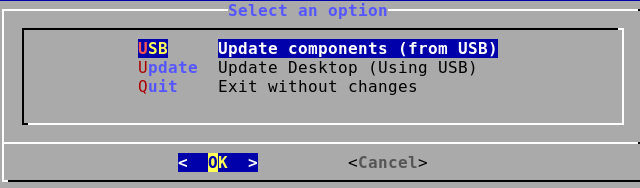
Step 2: Select Update Method
In the application, select Update → Update Desktop (Using USB).
Step 3: Choose USB Drive
Choose your USB drive from the list that appears.
Step 4: Unplug USB
Wait for the process to complete, then unplug the USB drive when prompted to do so.
Step 5: Reboot
The system updates automatically in the background. Once it is finished, press Y to reboot the computer, or reboot it manually.