Using the Computer
What is this section about?
This section covers day-to-day tasks on a TechLit computer, from changing settings to managing apps and games.
Changing System Settings (tl-sys-configure)
This is the main tool for setting up a computer’s name and its role in the classroom.
Note
Open this tool by typing tl-sys-configure in the terminal (logged in as admin).
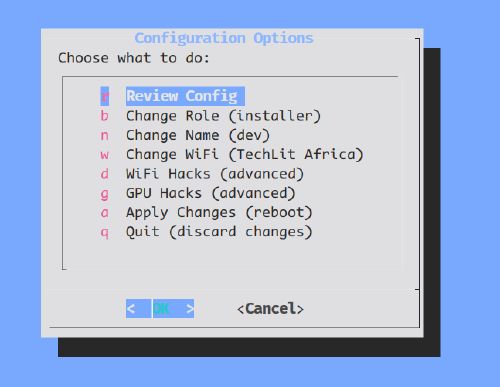
What you can do here
- Set Role: Make the computer a
server(main) or aclient(network role). - Wi-Fi Setup: Set the name of the classroom Wi-Fi network.
- Computer Name: Give the computer a unique name (like
tl-1234). - Fix Hardware: Turn on special fixes for older computers.
Managing Apps & Storage (tl-comp-manage)
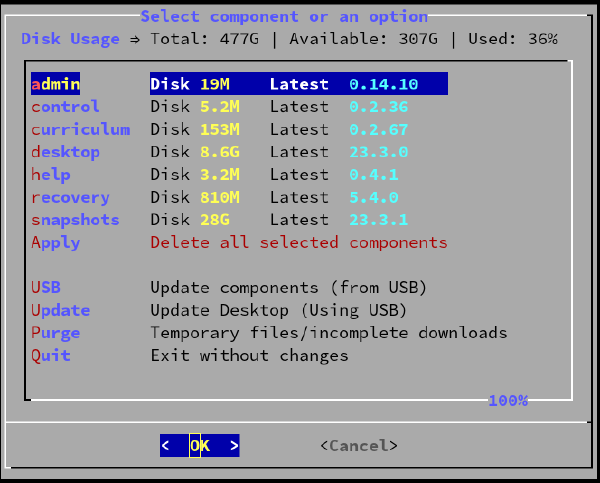
Use this tool to see which apps are installed and to free up disk space by removing old files.
Note
Search for “Manage Components” in the application menu to open this tool.
How to use this tool
Updating components (tl-comp-update)
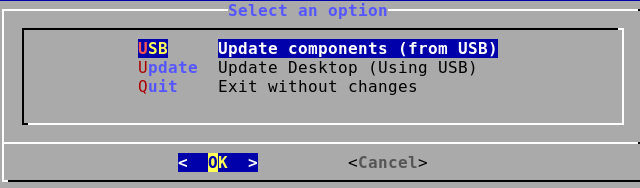
Use this tool to update the computer’s software using a USB drive.
Note
Search for “Update Components” in the application menu to open this tool.
How to use this tool
Adding Games
You can add games and other software to TechLit computers. These are managed just like other parts of the system.
For step-by-step steps on adding or removing games, see the Games Guide.
Programming Languages
TechLit computers use asdf to install and switch between the programming
languages we teach, like Python and JavaScript.
For install methods (USB, single computer, or the whole fleet), see the Languages Guide.
System Updates
How do I get the latest system software?
You mostly use the Component Updater tool for this. The method changes if you use a USB drive or the local network.
For full steps on all update methods, see the Update Guide.